August 2nd, 2026 / 4 Comments » / by admin
Note: All code supporting this architecture can be downloaded from my OneDrive folder HERE.
Introduction
For a long time, enterprise applications and enterprise data platforms occupied two reasonably well-defined corners of the technology landscape. Applications captured and presented information, while data platforms collected, integrated and analysed it. Somewhere between the two sat a small army of APIs, integration services, identity providers and data extracts trying to keep everything connected. That model still works well for many transactional systems, but it can become unnecessarily complicated when the application is primarily a window into data that already lives in an enterprise platform.
Hosting the frontend and API in a separate cloud is certainly possible, but it usually means another infrastructure stack, another identity integration, another secret store and another boundary across which sensitive data may need to travel. For organisations already using Snowflake as their central data platform, Snowpark Container Services – SPCS for short – offers a different option: run the application alongside the data, identity model and AI services, rather than treating Snowflake as a database behind an externally hosted app.
That is what this post explores: a data assistant architecture built as a custom Next.js and FastAPI application, packaged into a Docker container and hosted inside Snowflake using SPCS.
From Data Shoebox to Application Platform
Snowflake has long been treated as the curated store behind BI tools such as Power BI, Tableau or Qlik Sense. That remains a core strength. What has changed is that the same platform can now host and manage the application layer as well – not only the data that feeds it.
In practical terms, a Snowflake account can now provide:
- Containerised application hosting through Snowpark Container Services
- User authentication through Snowflake OAuth
- Access control through roles, grants and row access policies
- Secrets, image repositories, compute pools, ingress gateways and egress network rules
- Document search, structured analysis and generative AI through Cortex Search, Analyst, Agents and Complete
- Direct SQL access through the SQL API when deterministic aggregates are preferable to agent-driven reasoning
That expansion partially removes the need to treat every data interaction as a BI dashboard or an externally hosted web app. For many internal or customer-facing data assistants – chat over governed datasets, operational briefings, trend views, narrative summaries – the application can live next to the data rather than in a separate cloud stack that re-integrates identity, secrets and network controls from scratch.
The point is not that BI tooling disappears. Reporting and curated dashboards still matter. It is that when the application is primarily a governed window onto data already in Snowflake, the platform itself can now carry more of the hosting and management burden that used to sit elsewhere.
Also, the architectural implication is fairly direct. If the application is mainly a controlled window onto data that already lives in Snowflake, then moving the application runtime into the same trust boundary can remove a surprising amount of surrounding machinery. There is no separate app cloud for identity bridging, no parallel secret store for production credentials, and no standing pattern of shipping resident-level data out of the platform just so a frontend can render it. The container becomes compute sitting next to the data, not a remote system pulling the data towards itself.
Data App Hosting Models – Pros and Cons
There is no single Snowflake application model that suits every workload. The right choice depends on users and identity, UX needs, runtime flexibility, governance boundaries, operational complexity and whether the app must be distributed across accounts (click on image to expand).
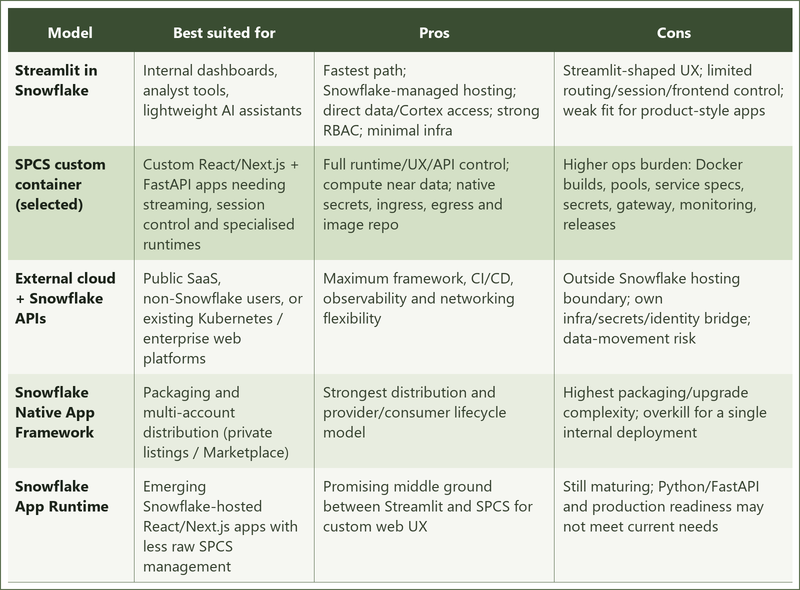
In short, Streamlit suits simple internal apps, Native Apps suit multi-account distribution, external hosting suits public SaaS platforms, and SPCS is the better fit when you need a custom frontend and API while keeping Snowflake as the data and security boundary.
For this solution, SPCS with a custom container was the deliberate choice. Streamlit would have been faster to stand up, but it would not have supported the level of frontend and session control required here. External hosting would have preserved that flexibility, but at the cost of another infrastructure stack, another identity bridge and another place where sensitive data may need to travel. Native Apps would have been overkill for a single internal deployment in one Snowflake account.
SPCS sits in the middle of that trade-off. It keeps Snowflake as the data and identity boundary, while still allowing a full Docker-based runtime with FastAPI, Next.js, custom routes and streaming behaviour. The application, the data and the user identity tokens never leave Snowflake’s trust perimeter. Access controls, secrets, compute and network egress are governed by the same Snowflake RBAC and security primitives that protect the underlying data.
App Overview and Demo
Snow GPT is a multi-tenant aged-care data assistant. Authenticated Snowflake users get four surfaces behind one container and one session:
- Chat – Cortex Agents orchestrates document search (Cortex Search) and structured analysis (Cortex Analyst); responses stream as text, tables, SQL and charts
- Daily briefing – live SQL aggregates in the chat sidebar
- Trends – time-series Vega-Lite charts over operational data
- Shift handover – structured shift data plus a Cortex Complete narrative for nursing handover
Users sign in with Snowflake OAuth. Downstream Cortex and SQL calls run under the user’s own token and role, so existing row-level controls govern what each tenant can see. The demo domain is aged care (facilities, residents, notes, staffing and related operational content), but the pattern applies to any governed multi-tenant dataset already in Snowflake.
Architecture Overview
The architecture is organised around a small set of principles. Snowflake remains the system of record and the policy enforcement point: operational data, tenant configuration, semantic views, roles and row access policies all live in the platform. User identity is preserved through AI execution – Cortex Agents, Cortex Complete and the SQL API run under the signed-in user’s OAuth token, not a privileged service account. Tenant identity is derived from the authenticated Snowflake role and never accepted from client parameters. The backend is a thin orchestration layer. Frontend and API ship as one artefact. Chat is streamed; briefing, trends and handover return cached JSON.
At the outer boundary, a browser reaches Snow GPT over HTTPS. The application runs as an SPCS container inside the Snowflake account trust boundary, alongside OAuth, Cortex services and tenant data – not as an external system calling in. There is no separate Model Context Protocol server; the app calls Cortex Agents, Cortex Complete and the SQL API directly. No customer data is sent to a separate application cloud or third-party model provider. The browser receives only the rendered application response, while the SPCS runtime communicates with Snowflake through controlled, allow-listed endpoints (click on image to expand).
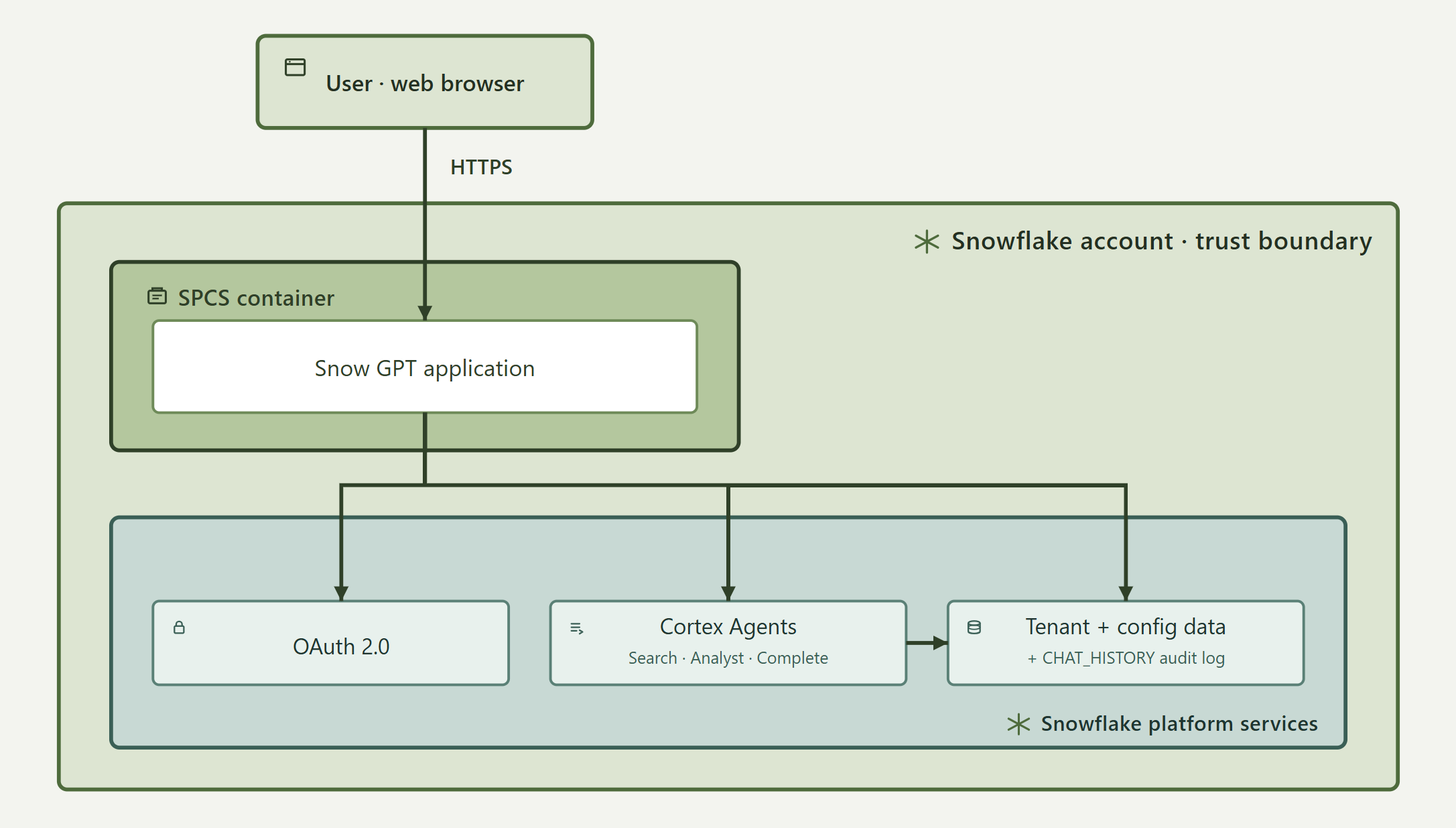
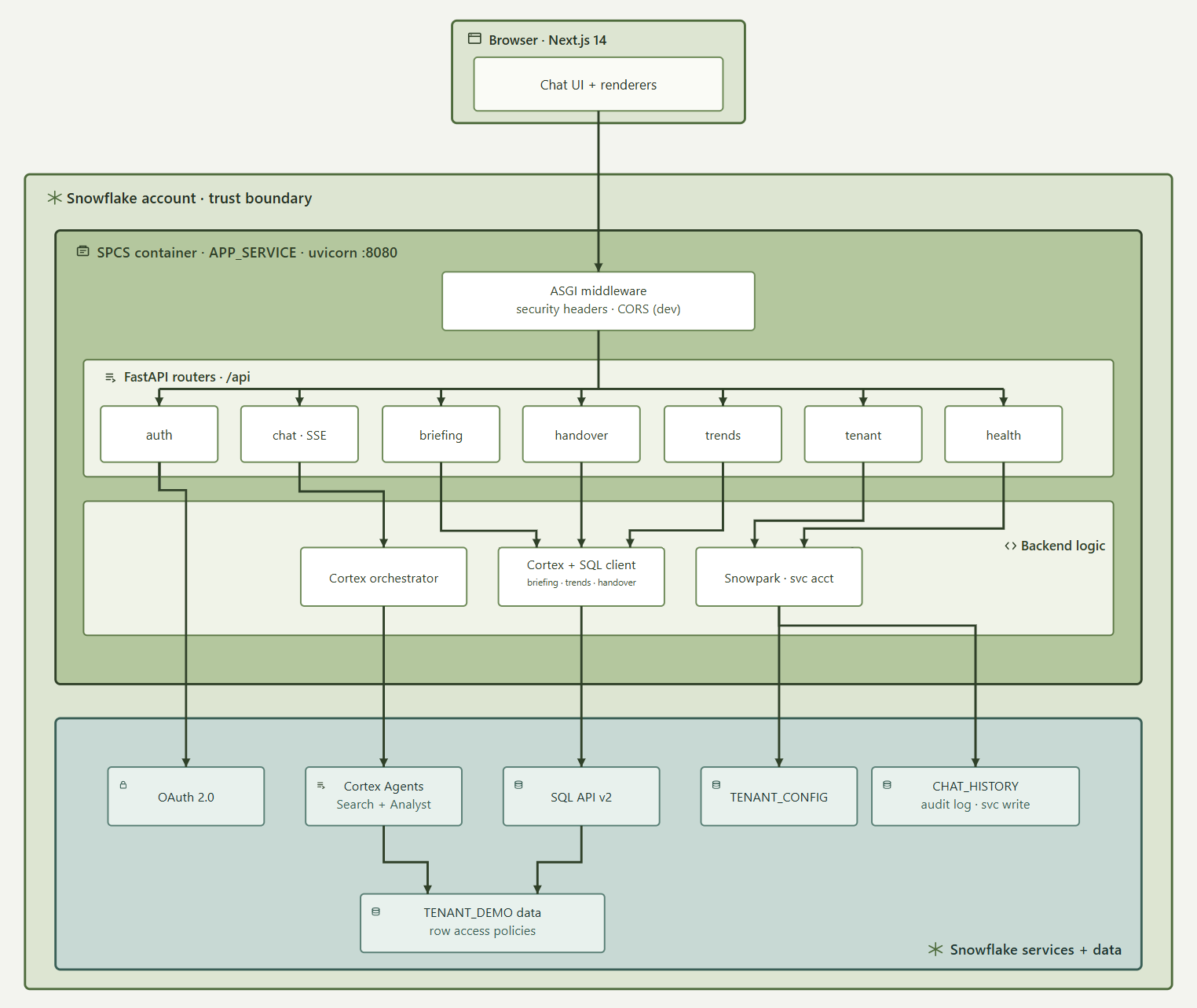
The runtime is a single container: a Next.js 14 static export for the UI, served by a FastAPI backend on Uvicorn port 8080 from the same origin. That keeps session handling, browser security and deployment simple – one image, one service, no production CORS bridge between frontend and API.
Requests enter through ASGI middleware (security headers; CORS only in development), then FastAPI routes into auth, chat, briefing, handover, trends, tenant and health. Authenticated routes validate an encrypted HttpOnly session cookie, refresh the Snowflake OAuth token if needed, apply per-route rate limits, and call backend services.
Chat is the primary path. The browser posts to POST /api/chat; the backend streams Server-Sent Events. A Cortex orchestrator builds the agent:run payload, injects a TENANT_KEY filter for document search, normalises streamed events and deduplicates repeated blocks. Cortex Agents uses Cortex Search for clinical/care-plan text and Cortex Analyst for structured operational questions. Conversation state stays in the browser – each request resends prior text turns; there is no user-facing conversation resume API.
Briefing, trends and handover also use the user’s OAuth token via a shared SQL API client. Briefing returns daily aggregates for the sidebar. Trends builds Vega-Lite chart specs from time-series queries. Handover gathers structured shift data, then calls SNOWFLAKE.CORTEX.COMPLETE for the nursing narrative. Those endpoints are JSON with server-side TTL caches (briefing ~10 minutes, trends ~1 hour, handover ~5 minutes).
A Snowpark service-account session is used only for platform tasks: reading TENANT_CONFIG (branding and model settings) and writing completed chat turns to CHAT_HISTORY. It never executes user AI queries and never reads TENANT_DEMO operational data. That split identity model – user token for tenant data and AI, service account for config and audit – is the central security design point (click on image to expand).
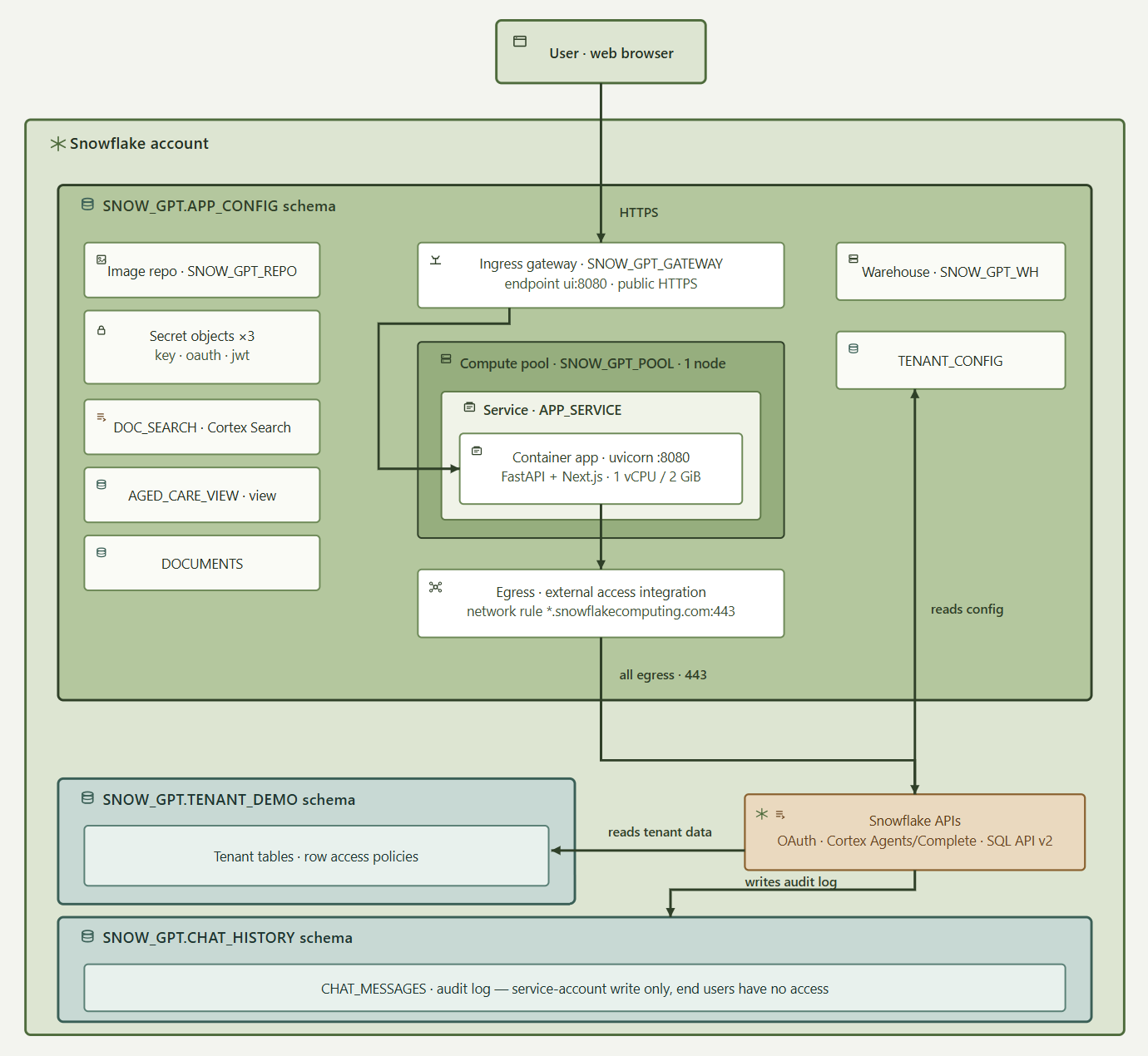
On the infrastructure side, public traffic enters through the SPCS ingress gateway SNOW_GPT_GATEWAY, which exposes ui:8080 and provides a stable public URL. That stability matters because OAuth redirect URIs are bound to the app address; the gateway keeps the URL valid across service upgrades. APP_SERVICE runs in compute pool SNOW_GPT_POOL as a single node, with the container capped at 1 vCPU and 2 GiB – an intentional POC scale, not a production HA claim. The image is a two-stage build (Node for the Next.js export, Python for FastAPI) pulled from SNOW_GPT_REPO.
Secrets – service-account private key, OAuth client secret and session encryption secret – are Snowflake Secret objects injected at runtime, not baked into the image. Outbound access is restricted by a network rule and External Access Integration to *.snowflakecomputing.com:443 only, covering OAuth, Cortex and the SQL API. The container cannot reach arbitrary external hosts.
Data ownership is reflected in three schemas. SNOW_GPT.APP_CONFIG holds the image repository, secrets, gateway, compute pool, service, TENANT_CONFIG, DOCUMENTS, DOC_SEARCH and AGED_CARE_VIEW. SNOW_GPT.TENANT_DEMO holds multi-tenant operational tables (facilities, rooms, beds, residents, staff, progress notes, care plans and related objects), each row carrying TENANT_KEY and protected by row access policies. SNOW_GPT.CHAT_HISTORY.CHAT_MESSAGES is an append-only audit log of user and assistant turns, readable only by ACCOUNTADMIN, SYSADMIN, SNOW_GPT_ADMIN and SNOW_GPT_APP_ROLE – end users cannot read it back, even for their own messages (click on image to expand).
Authentication is Snowflake OAuth 2.0 with PKCE. After login, the app issues a Fernet-encrypted HttpOnly session cookie (tokens, tenant and role stay opaque if leaked). Tenant isolation is layered: OAuth sign-in, tenant-specific default role, backend role-to-tenant derivation, user-token Cortex/SQL execution, row access policies on CURRENT_ROLE(), an explicit Cortex Search TENANT_KEY filter, and least-privilege grants on warehouse, schema, semantic view, search service and tables.
Around the edges, the orchestration layer also applies rate limiting (chat 20/min, briefing 30/min, trends 20/min, handover 10/min, login 30/min), security headers, production same-origin behaviour and input validation. Those controls harden the app; they do not replace Snowflake policy. Clinical and regulatory sign-off for real resident data remains an organisational gate beyond this POC architecture.
Why this architecture also wins on cost is easy to understate. A single-node CPU_X64_XS compute pool is Snowflake’s smallest SPCS instance class, and with AUTO_SUSPEND_SECS = 300 it scales to zero credits five minutes after the last request – you pay only for active usage, not for a permanently-on server, load balancer and orchestration layer the way you would hosting the same FastAPI/Next.js container on ECS, Cloud Run or a VM. The trade-off is a cold-start delay of roughly ten to twenty seconds the first time someone opens the app after an idle period — acceptable for an internal or moderate-traffic assistant, and tunable by raising MIN_NODES to 1-always-on if that latency ever matters more than the idle credit spend. Compare that to the standing cost of a separate application cloud: a load balancer, container runtime, secrets manager, and identity bridge running continuously regardless of traffic, plus the egress cost and latency of shipping tenant data out of Snowflake on every request.
Beyond Healthcare: Other Industries, Same Architecture
The pattern here – a governed dataset already in Snowflake, a custom UI instead of a generic dashboard, and user-scoped OAuth and row access policies enforcing who sees what – generalises far beyond aged care: financial services could use it for fraud triage or compliance copilots over transaction data; retail and CPG for demand-planning or inventory assistants over point-of-sale and supply data; manufacturing for quality and supply-chain dashboards over plant telemetry; insurance for claims-triage tools over policy and claims history; telcos for network-operations copilots over usage data; life sciences for clinical-trial data explorers under strict data-residency rules; and public-sector agencies for citizen-services portals where data must never leave a sovereign boundary. Each of these swaps in a different schema, role model and frontend, but the same shape carries across unchanged – and when an application is mainly a governed interface over data that already lives in Snowflake, another hosting stack is often more complexity than value.
BI tooling and Streamlit still suit simpler internal apps, but for custom apps that need streaming, session control and Cortex under the user’s own identity, SPCS lets the application sit beside the data without inventing a second security perimeter. It is not the right fit for every application, and not a shortcut past clinical or regulatory review – but for Snowflake-centric data assistants that need a modern UI inside the platform that already owns the data and the identity model, it is an increasingly practical one.
Posted in: Snowflake, SQL, Uncategorized, Visualisation
Tags: Cloud Computing, Snowflake
May 13th, 2026 / 5 Comments » / by admin
Note: All code supporting this architecture can be downloaded from my OneDrive folder HERE.
Introduction
Organizations working with clinical data face a persistent problem: free-text clinical notes are among the most analytically valuable assets in a health data platform, yet they are also the most sensitive. Patient names, dates of birth, Medicare numbers, addresses, phone numbers, staff identifiers – these are embedded throughout care documentation in ways that are structurally unpredictable, clinically nuanced, and impossible to reliably sanitize with simple regex alone. The consequence is that access to this data is heavily restricted, manual sanitization is slow and inconsistent, and downstream AI and analytics use cases are perpetually blocked behind approval gates.
The conventional responses – regex-only scrubbing, commercial NLP tools, or synthetic data generation – each carry their own failure modes. What the problem actually demands is a layered, hybrid approach: combine the deterministic reliability of pattern matching with the contextual reasoning of large language models and the structural recognition of named entity recognition models, wrap all of it in a governed pipeline with human review capability, and make the whole thing configurable without requiring code changes.
That is what this post describes. This architecture is a config-driven de-identification pipeline built on LangGraph, powered by Snowflake Cortex for all LLM inference and deployed on Snowpark Container Services (SPCS) for optimal runtime. Rather than calling external model APIs, every LLM completion in the pipeline – normalization, entity detection, de-identification, validation, and QA feedback – runs through Snowflake’s native CORTEX.COMPLETE() function, keeping data processing within the Snowflake boundary. This solution can be hosted on SPCS against a Snowflake-hosted schema and includes a Snowflake-native deployment: the inference layer, the data store, the audit logs, the whitelist management, the containerized service deployed into SPCS for runtime and the Streamlit-based review console all live within Snowflake.
Why LangGraph?
Before getting into the architecture, it is worth explaining the choice of LangGraph as the orchestration framework. LangGraph is an open-source library within the LangChain ecosystem designed specifically for stateful LLM and agent workflows. Its core model is a directed acyclic graph (DAG) with shared state, typed nodes, and conditional edges – it is aimed at long-running workflows or agents that may need memory, branching, tool use, persistence, retries, and human review.
For a de-identification pipeline this is an excellent fit. The reasons are practical rather than theoretical:
- Typed shared state – every node reads from and writes to a single DeidState TypedDict, so inter-node data contracts are explicit and enforced at the Python type level.
- Native parallel fan-out – running three or four detectors in parallel is expressed as a proper DAG fan-out, not threads bolted on top of a function chain.
- Conditional edges – the validate → retry → de-identify loop is a first-class concept in LangGraph, not a workaround.
- Observability – LangGraph’s built-in Mermaid and ASCII graph renderers mean you get a live, accurate picture of whatever topology the YAML has produced, including which nodes are enabled and which models they are running.
Architecture Overview
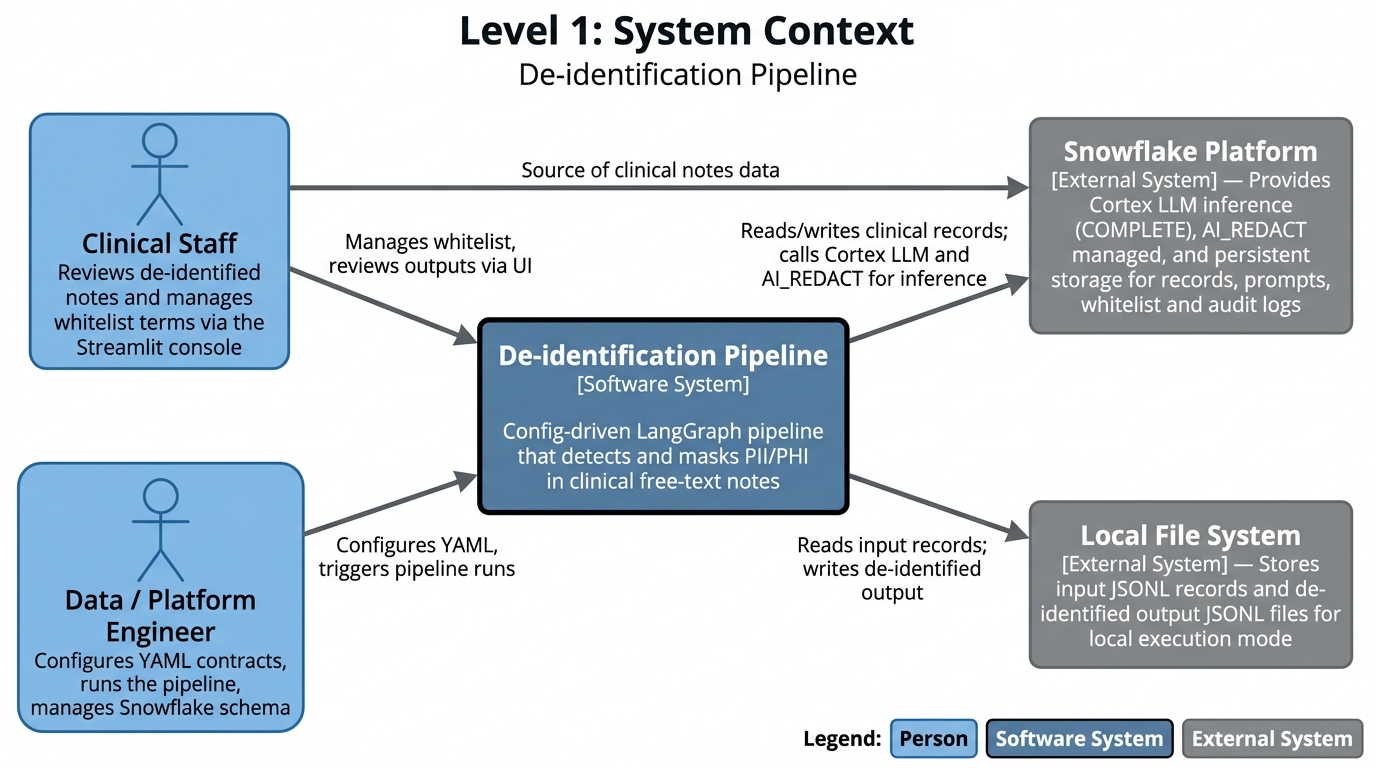
The pipeline sits at the center of a small ecosystem of two human roles and two external system dependencies. Data engineers own the operational layer – configuring YAML contracts that govern pipeline behaviour, triggering runs, and managing the Snowflake schema – without needing to touch Python code. Clinical staff are both the source of the notes being processed and the consumers of de-identified output, interacting with the system through a Streamlit review console.
Snowflake is the primary external dependency, playing a dual role: it is both the inference backend (via SNOWFLAKE.CORTEX.COMPLETE() for LLM calls and AI_REDACT for managed PII detection), hosting platform and the persistence layer for clinical records, prompt version history, QA audit logs, and the clinical whitelist table. The local file system supports an alternative execution mode for development and testing without requiring Snowflake credentials.
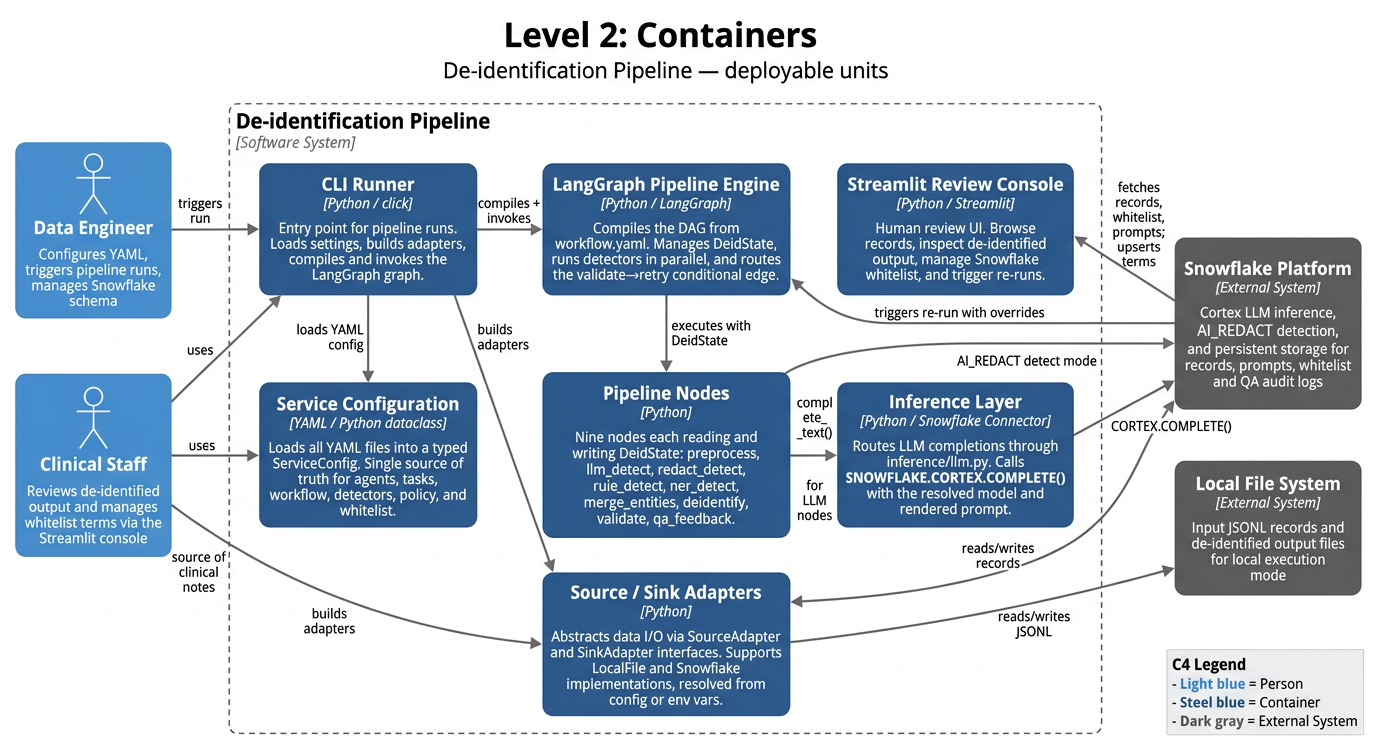
All pipeline behavior – workflow topology, LLM model selection, prompt templates, detector rules, masking policy, and validation thresholds – is declared in a bundle of YAML files loaded into a central ServiceConfig dataclass at startup. The system can be reconfigured without touching Python code. At runtime, a LangGraph pipeline engine compiles these settings into a DAG and orchestrates nine processing nodes.
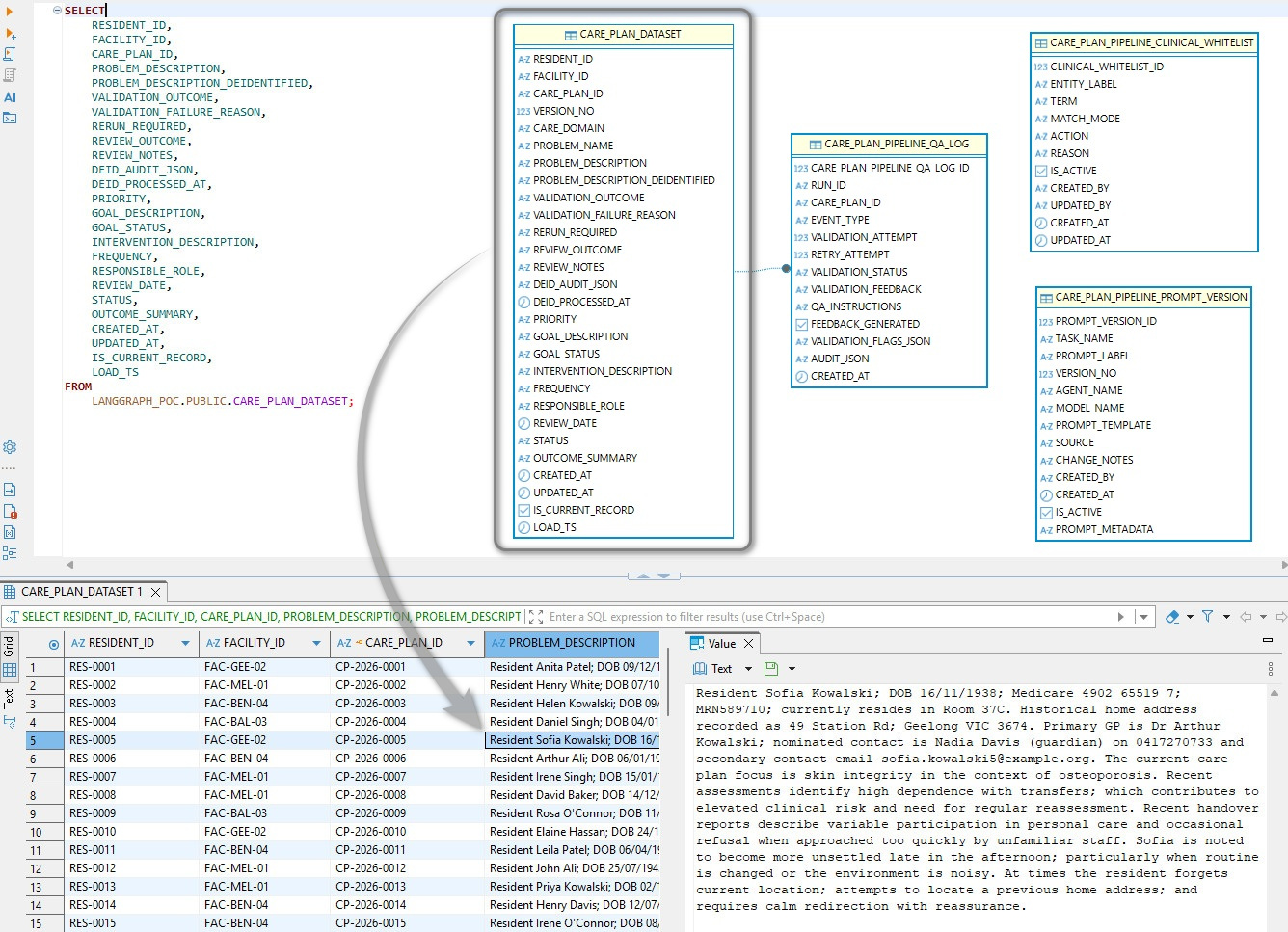
The Snowflake schema is centered on CARE_PLAN_DATASET, which stores the core care-plan record (resident/facility/care plan IDs, clinical narrative fields, validation outcomes, review metadata, and audit timestamps) with IS_CURRENT_RECORD and LOAD_TS supporting versioned ingestion. Resident description data was synthesized using LLM and while it hasn’t been checked for clinical accuracy, its content should align with typical aged care resident scenarios. Around that, the pipeline is governed by supporting tables capturing run-level QA/validation events and feedback, providing controlled prompt/model versioning and approved clinical term matching rules used by the validation workflow.
Node-by-Node Breakdown
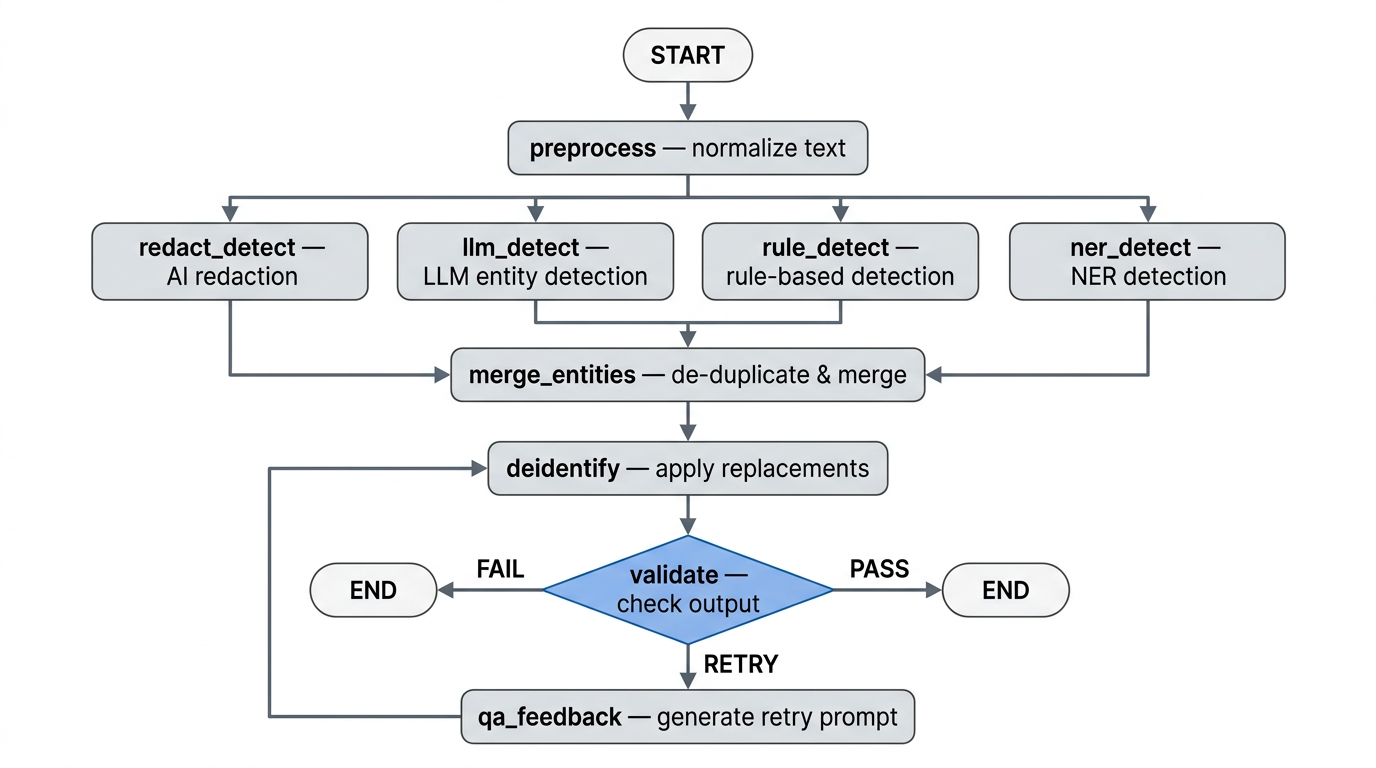
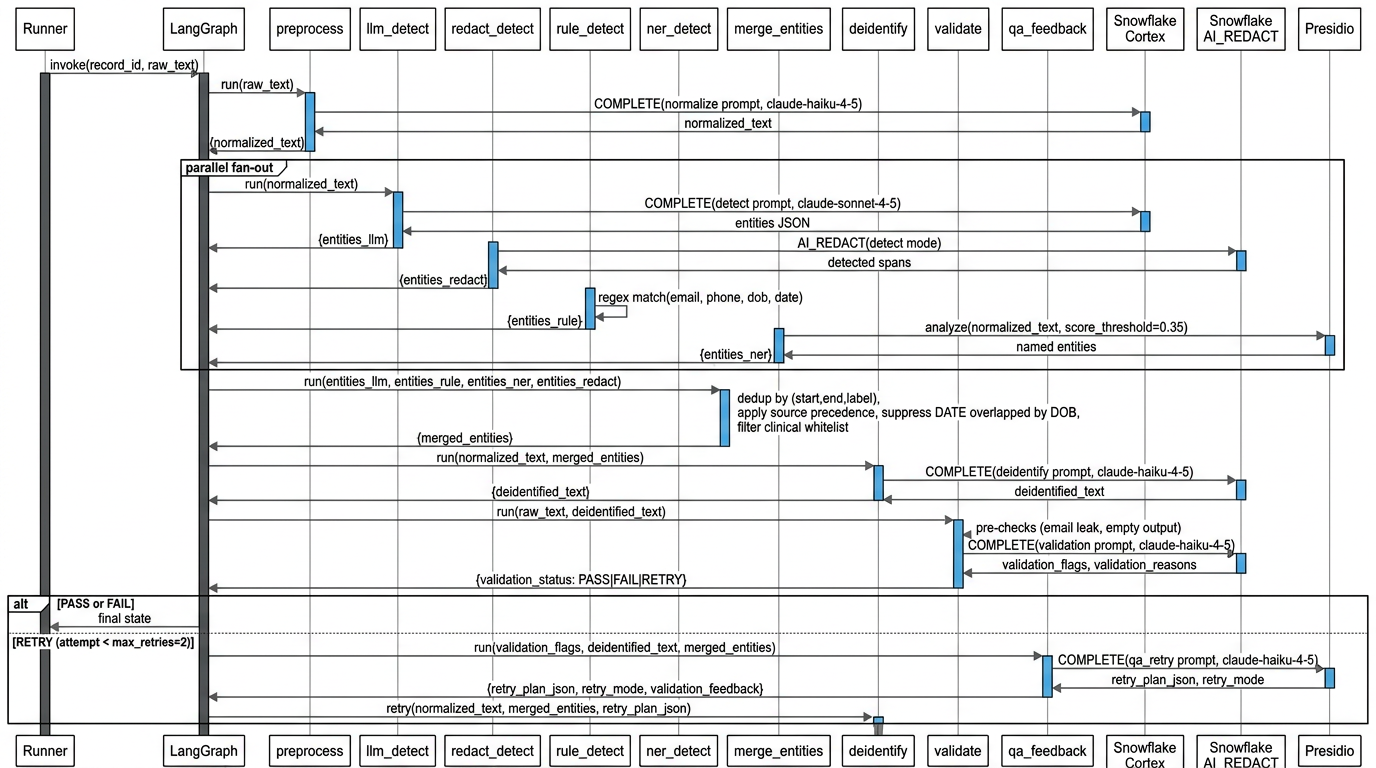
The pipeline runs nine nodes in sequence. Each has a clearly scoped responsibility and a defined set of state fields it reads from and writes back to. Nodes requiring LLM inference call Snowflake Cortex at temperature 0.0. Nodes that don’t require inference run as pure Python with no external calls.
preprocess – Normalize Text
Takes raw_text from state and produces normalized_text with minimal cleanup: collapsing whitespace and fixing unambiguous OCR artifacts. The constraint is faithfulness – names, numbers, dates, and clinical facts must be preserved exactly as written. claude-haiku-4-5 is used here because normalization is low-risk and cost per token matters at scale.
llm_detect – LLM Entity Detection
The primary, highest-recall detector. Sends normalized_text to claude-sonnet-4-5 via Snowflake Cortex with a prompt instructing it to identify all PII/PHI spans and return strict JSON only. Entity types targeted: NAME, STAFF, PHONE, EMAIL, ADDRESS, LOCATION, DOB, DATE, ID, ORGANISATION. The model prefers recall over precision and returns exact character-level start and end offsets. Sonnet is used rather than Haiku because distinguishing a patient name from a facility name, or finding a Medicare number in free prose, requires genuine clinical context understanding.
redact_detect – Snowflake AI_REDACT
Delegates to Snowflake’s native AI_REDACT SQL function in detect mode, which returns detected spans rather than masked text. Results are mapped into the shared entity schema. This layer is fast, auditable, and makes no additional LLM call – it serves as a redundant coverage layer for spans the LLM detector misses or mis-indexes.
rule_detect – Regex Pattern Detector
Fully deterministic, no external calls. Compiled regex patterns from detectors.yaml are applied directly to normalized_text using Python’s re module. The pattern set covers four high-confidence types: EMAIL, PHONE, DOB (only when preceded by an explicit label such as “DOB:” or “Date of Birth:”), and DATE (only in unambiguous formats). The rule detector only fires on unambiguous structural patterns and never infers – its value is zero false-negative misses on structured entities, providing an auditable baseline that operates independently of any model.
ner_detect – Named Entity Recognition (Presidio)
Runs Microsoft Presidio’s AnalyzerEngine over normalized_text at a score threshold of 0.35. Presidio provides contextual entity recognition beyond what regex can capture – particularly for person names, locations, and organizations without a fixed structural pattern. It uses spaCy or Hugging Face transformers as the underlying NER engine, running locally with no external API call.
merge_entities – Deduplicate and Merge
Once all four detector branches complete, LangGraph synchronizes at merge_entities. Entities are iterated in configured source precedence order (llm – rule – ner – redact), keyed on (start, end, label). Duplicates are dropped on a first-source-wins basis. A DATE entity overlapping a DOB entity is also dropped, since DOB is the more specific classification. The surviving list is sorted by character offset ascending.
Before the final list is written to state, each entity is checked against the clinical whitelist. Matches are silently dropped and never reach the de-identify node. This is what prevents the pipeline from masking common clinical vocabulary – terms like “daily”, “nocte”, or “mobility” – which detectors may legitimately tag but which carry no privacy risk in context. The whitelist is managed in clinical_whitelist.yaml for file-based runs and in a Snowflake-backed table editable through the Streamlit console at runtime.
deidentify – Apply Masking
Applies the replacement policy from deid_policy.yaml over normalized_text using merged_entities. Each span is replaced with a bracketed label token – [NAME], [DOB], [PHONE] – with a default template of [{LABEL}] for anything not explicitly mapped. Replacements are applied right-to-left so that modifying a span later in the string does not invalidate the offsets of earlier spans. On retry passes the node receives a structured repair plan from state and applies only the narrow QA-directed corrections rather than re-running the full masking pass.
validate – Quality Gate
Validation runs in two layers. First, deterministic Python pre-checks with no LLM call flag obvious failures such as a potential email leak or empty output. Second, claude-haiku-4-5 audits the output for residual PII/PHI leakage or severe readability breakage under a permissive standard – minor stylistic differences are not flagged. The model returns validation flags, human-readable reasons, and issues, each requiring an evidence substring copied directly from the de-identified output. The conditional edge then routes: PASS to END, FAIL to END with audit logging, and RETRY to qa_feedback if the attempt count is below max_retries (default 2, configurable in validation.yaml).
qa_feedback – Retry Prompt Generation
Only reached on a RETRY route from validate. Translates the validation output into a structured JSON repair plan for the deidentify node, containing a retry mode, entity-level corrections (drop, relabel, or adjust span), exact substring text replacements, and an acceptance criteria checklist. The model is instructed to prefer targeted corrections over broad rewriting and to flag likely false positives explicitly rather than correcting them blindly.
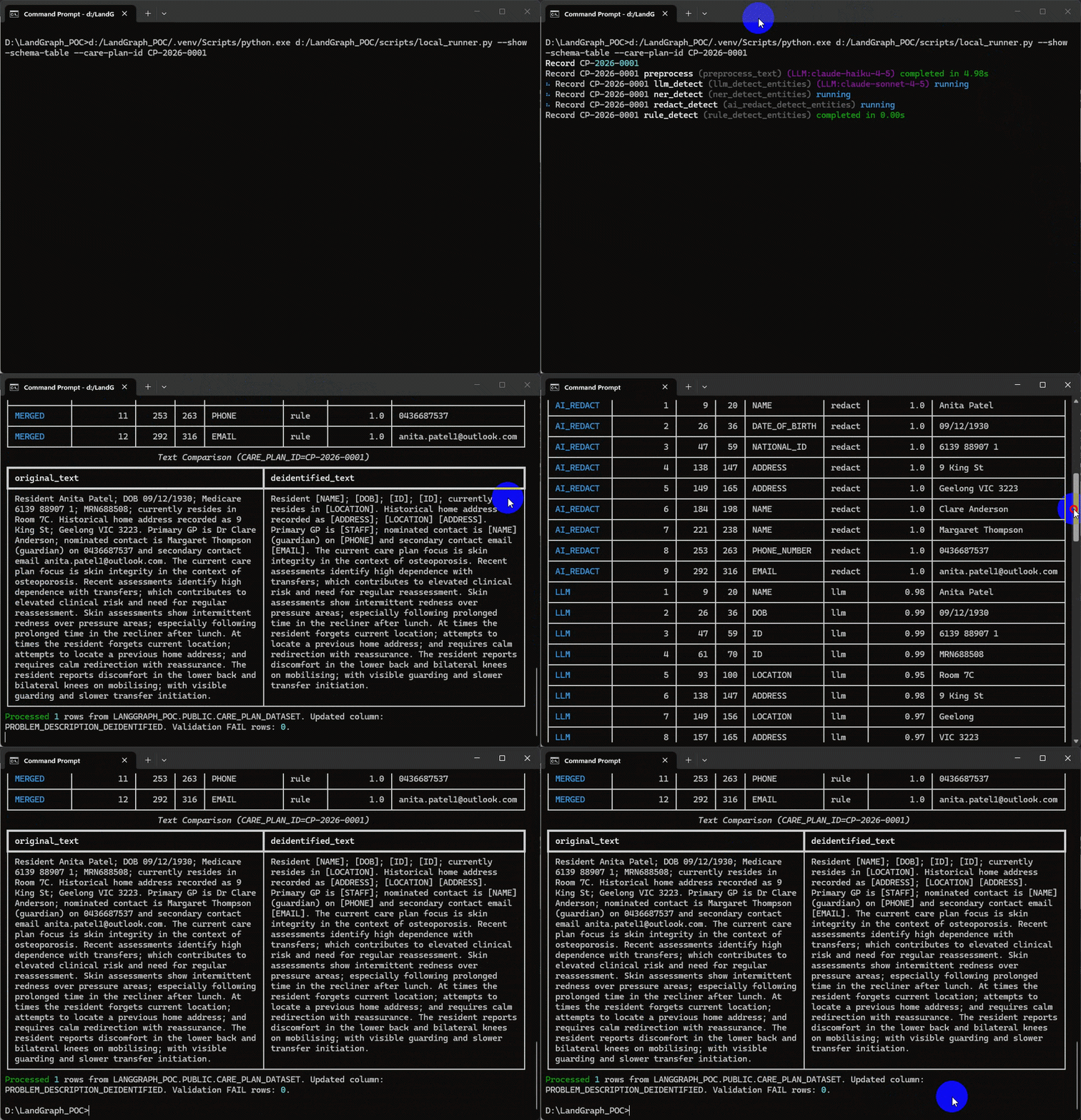
The following screen capture depicts the de-identification pipeline running in terminal for a single care plan id with the added option to display two tables – first one containing summary (counts) of PPI/PHI entities for each active detector and the second one providing additional details for each entity found e.g. starting and ending index, confidence score etc. alongside the actual entity text.
The Streamlit Review Console
The Streamlit application is the operational front-end of the de-identification platform. It translates a technically complex, multi-step NLP/LLM workflow into an interface that clinical, data, and governance users can run safely and repeatedly. Rather than treating de-identification as a one-off batch script, the app positions it as a managed process with monitoring, controls, and auditability built in.
From an architecture perspective, the app has a clean layered model. The presentation layer handles user interaction, filtering, and visualization. A session and state layer tracks selected filters, model choices, and run state across reruns. An orchestration layer manages background execution and stop requests. The runtime layer invokes the configurable de-identification graph. The persistence layer reads and writes operational data to Snowflake. This separation is important because it allows each concern to evolve independently – interface changes do not require workflow rewrites, and model or prompt updates do not require UI redevelopment.
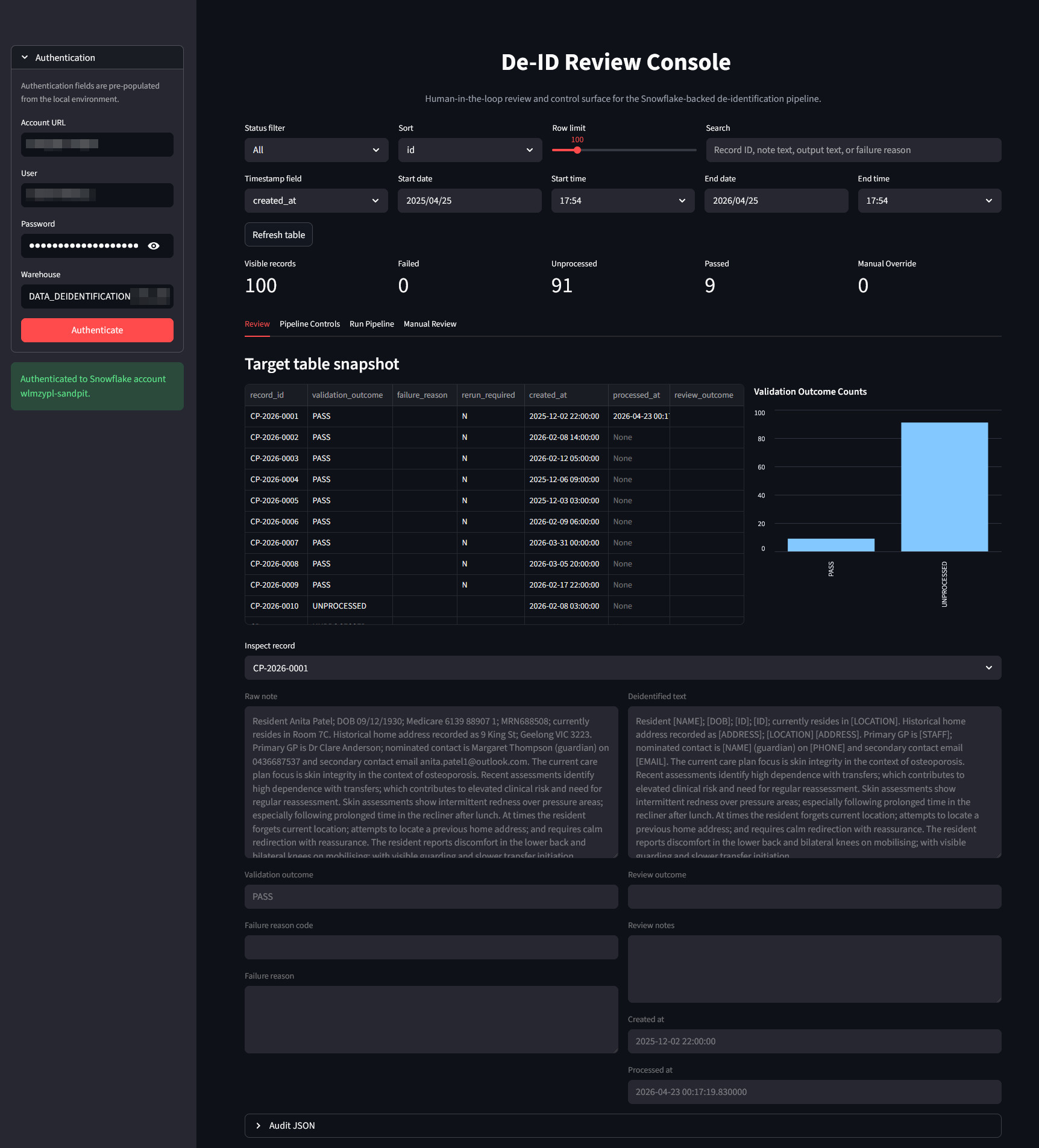
Once authenticated, users move into a structured record exploration workflow. They can filter records by lifecycle state (failed, unprocessed, passed, manual override), narrow by free-text search, and constrain by timestamp windows. This gives teams operational triage capability: QA reviewers can prioritize records requiring intervention, while engineering or analytics teams can inspect trends and isolate specific cohorts.
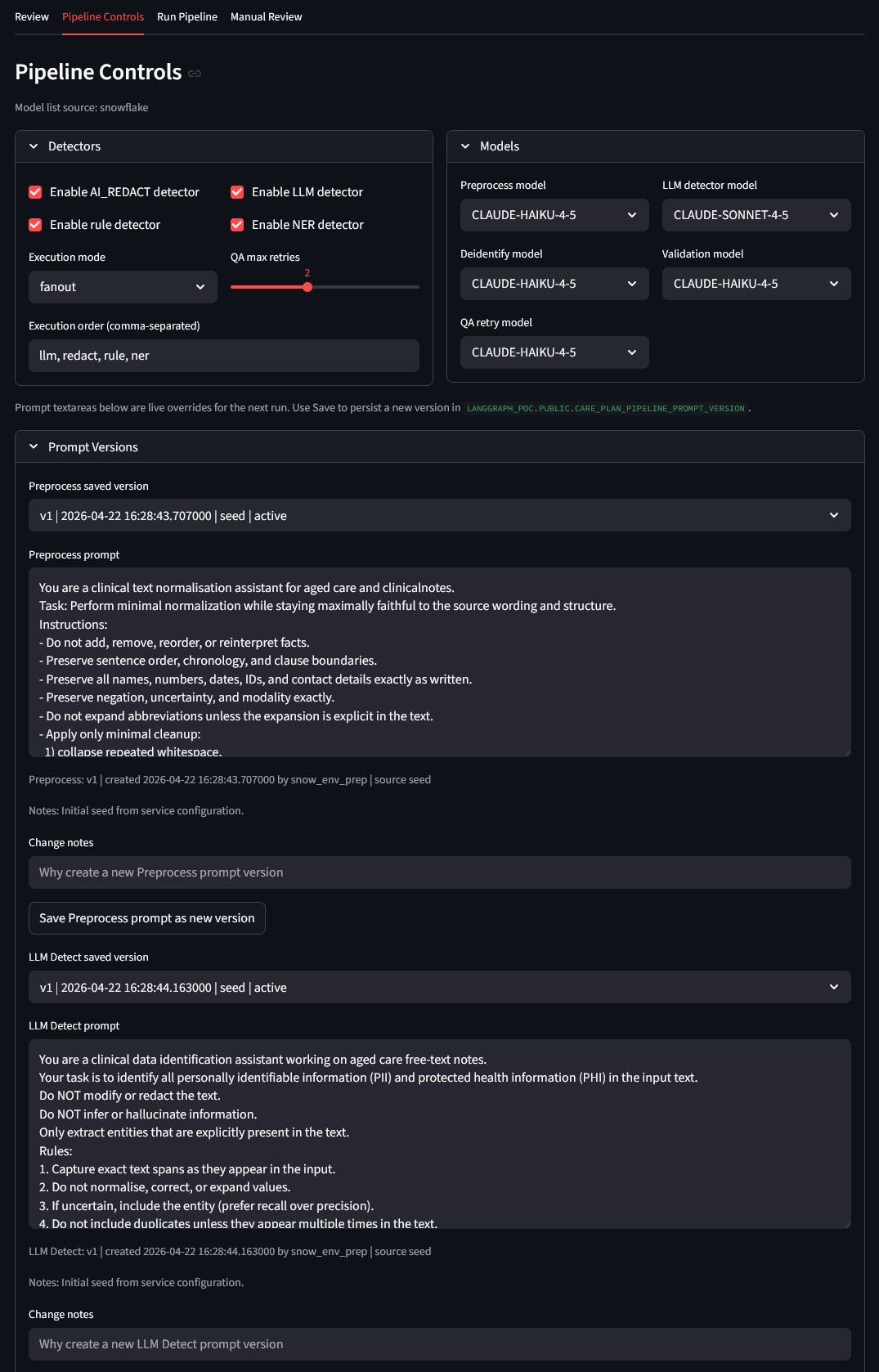
A core capability is runtime configurability. The app exposes detector toggles and execution strategy (parallel fanout or sequential), QA retry limits, and per-task model selection. This enables controlled experimentation and tuning without direct code edits. Teams can respond quickly to operational findings, such as adjusting model assignments or changing detector execution order when false positives or misses are observed.
Prompt lifecycle management is treated as a first-class operational function. Users can view saved prompt versions by task, load a baseline or historical version, apply temporary live overrides for the next run, and persist a new version with metadata and change notes. This establishes a practical governance loop: prompt edits are traceable, versioned operational artifacts rather than ad hoc text changes buried in code.
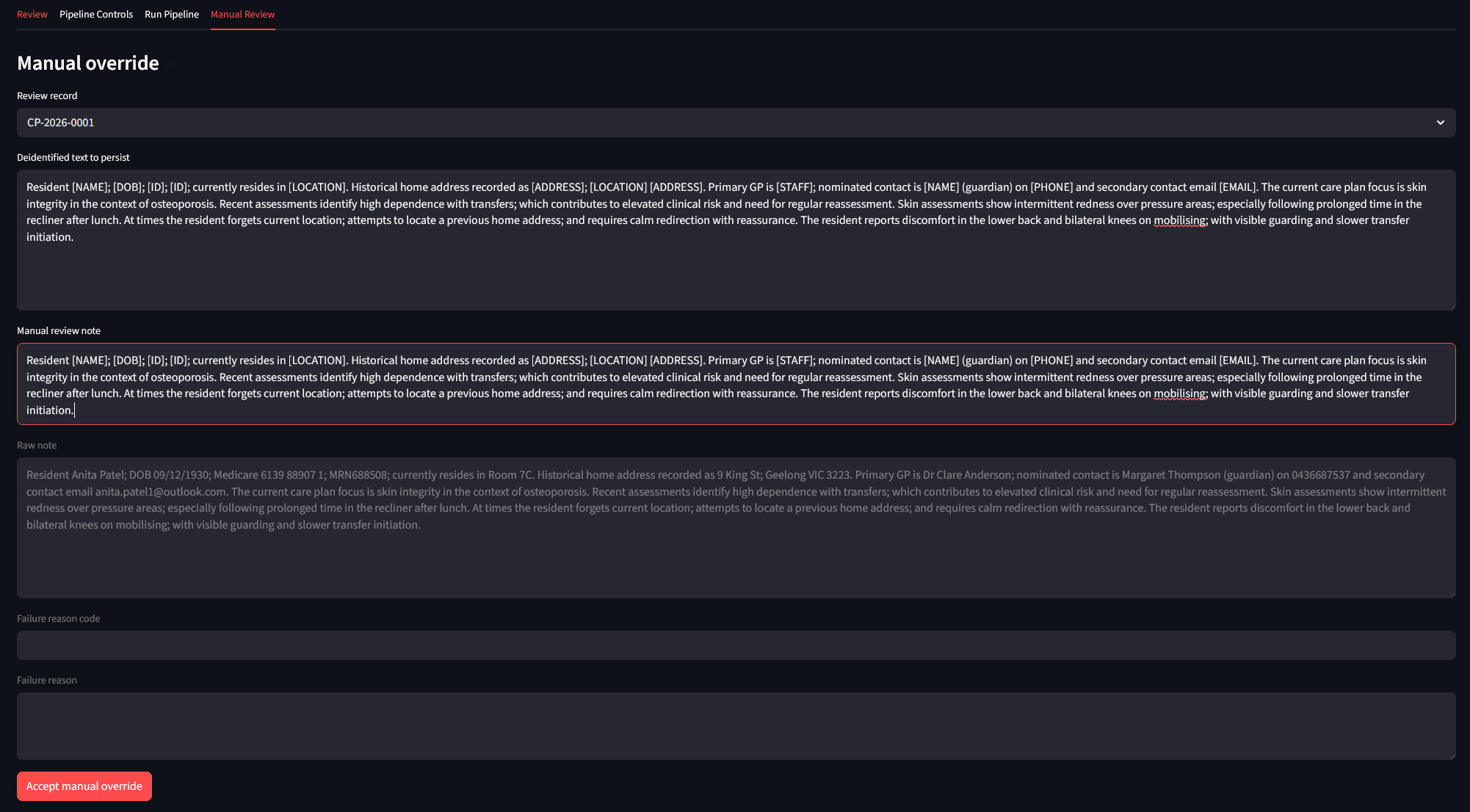
Where automation is insufficient, a manual review capability closes the loop. A reviewer can edit de-identified output, provide review notes, and persist an explicit acceptance decision. This ensures difficult cases are resolved in-system rather than through offline workarounds. The result is a complete human-in-the-loop pathway: automated detection and transformation, machine validation and retry, then reviewer adjudication when needed.
Snowpark Container Services (SPCS) Deployment
One of the deliberate architectural decisions in this solution is that Snowflake is not just a data store – it is the runtime. All LLM inference runs through Snowflake Cortex, all persistent state lives in Snowflake tables, and the Streamlit review console is designed to run as a Snowflake-hosted app.
Snowpark Container Services (SPCS) allows Docker containers to run directly within a Snowflake account, with native access to Snowflake objects, secrets, network egress rules, and compute pools – without data ever leaving the Snowflake boundary. For runtime, the solution deploys a Python FastAPI de-identification service into SPCS, exposing an internal HTTP endpoint that is called through a Snowflake service function, thus allowing SQL users and procedures to run the LangGraph de-identification workflow against care plan records stored in Snowflake. The runtime is containerized from the project Dockerfile and deployed by scripts/deploy_spcs.py. Deployment creates the Snowflake image repository, pushes the container image, uploads the rendered SPCS service specification, creates the compute pool and service, and registers the SQL function/procedure used to invoke the service.
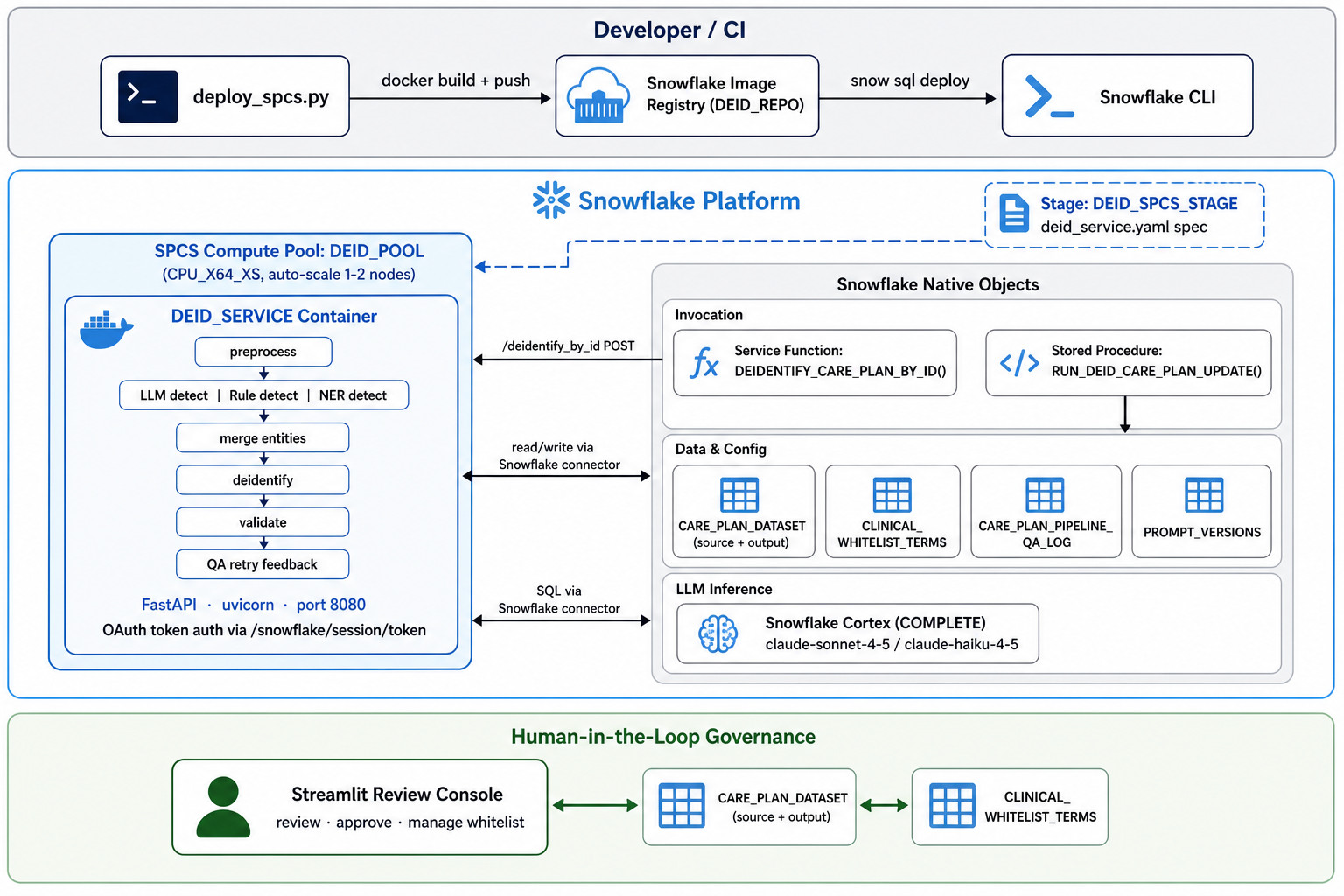
End-user implementation relies on a dedicated stored procedure, which persists de-identified output back to the care plan table, including de-identified text, validation outcome, failure reason, rerun flag, audit JSON, and processed timestamp. The service endpoint is private – this means the container is invoked internally by Snowflake service functions rather than being exposed publicly.
The result is a fully enclosed deployment topology: the pipeline container runs in SPCS, the LLM calls go through Cortex, the operational data stays in Snowflake tables, and the governance UI runs as a native Snowflake app. Governed data access, audit logging, network isolation, and compute scaling are all handled by the platform rather than bespoke infrastructure. For organizations already invested in Snowflake as their data platform, this means de-identification capability can be deployed and operated without introducing any additional services, vendors, or egress risk.
Efficacy Testing
Testing was conducted on 100 synthetically generated aged care resident notes containing GP and resident names, addresses, phone numbers, email addresses, and Medicare numbers. The initial run used claude-sonnet-4-5 for LLM detection and claude-haiku-4-5 for preprocessing, validation, de-identification, and QA feedback.
Initially, 31 of the 100 records failed validation. Every failure had the same root cause: the word “daily” in the phrase “activities of daily living” was being tagged as a DATE entity and masked as [DATE], producing the nonsensical output “activities of [DATE] living”. The validation model correctly flagged this as a material readability failure, and the QA feedback node described it precisely: “Incorrect placeholder substitution: ‘daily’ (a non-sensitive clinical descriptor) was replaced with ‘[DATE]’, creating semantic corruption. The phrase ‘activities of [DATE] living’ is nonsensical and impairs clinical readability. Switching LLM models made no difference. The root cause was not in the validation or feedback logic – it was in the detection layer. “Daily” pattern-matches temporal heuristics, and without a suppression mechanism it will be consistently mis-tagged. The fix required no code changes. Adding “daily” and related terms to clinical_whitelist.yaml and the corresponding Snowflake whitelist table achieved a 100% pass rate on the same records. This result illustrates something important about hybrid detection pipelines: failure modes are systematic and fixable at the configuration layer. The LLM correctly identified “daily” as a temporal descriptor – the problem is that in a clinical note it is standard vocabulary, not a sensitive identifier. That distinction requires domain knowledge, and the whitelist is the mechanism for encoding it.
Conclusion
The architecture described here shows that a governed, accurate de-identification pipeline does not require a monolithic NLP platform or a dedicated modelling team. YAML-driven configuration, hybrid detection with explicit precedence, a clinical whitelist for false-positive suppression, LLM-backed validation with structured retry, and a Streamlit console for human-in-the-loop governance each solve a specific, real problem – and none of them require code changes to reconfigure.
The system is also very extensible. Adding a detector, changing a prompt, or adjusting a masking policy is a configuration change. The Snowflake-native deployment means no separate infrastructure to manage. For teams looking to move beyond ad hoc de-identification, this is a practical and productizable starting point.
Posted in: Snowflake
Tags: LLM, Python, Snowflake, Streamlit



Yes, with some changes and additions e.g. found out that AI_REDACT is way to slow for high volumes, so I'd…