Building Snowflake-Centric GenAI Data Apps: Why SPCS Beats Streamlit and External Hosting
Note: All code supporting this architecture can be downloaded from my OneDrive folder HERE.
Introduction
For a long time, enterprise applications and enterprise data platforms occupied two reasonably well-defined corners of the technology landscape. Applications captured and presented information, while data platforms collected, integrated and analysed it. Somewhere between the two sat a small army of APIs, integration services, identity providers and data extracts trying to keep everything connected. That model still works well for many transactional systems, but it can become unnecessarily complicated when the application is primarily a window into data that already lives in an enterprise platform.
Hosting the frontend and API in a separate cloud is certainly possible, but it usually means another infrastructure stack, another identity integration, another secret store and another boundary across which sensitive data may need to travel. For organisations already using Snowflake as their central data platform, Snowpark Container Services – SPCS for short – offers a different option: run the application alongside the data, identity model and AI services, rather than treating Snowflake as a database behind an externally hosted app.
That is what this post explores: a data assistant architecture built as a custom Next.js and FastAPI application, packaged into a Docker container and hosted inside Snowflake using SPCS.
From Data Shoebox to Application Platform
Snowflake has long been treated as the curated store behind BI tools such as Power BI, Tableau or Qlik Sense. That remains a core strength. What has changed is that the same platform can now host and manage the application layer as well – not only the data that feeds it.
In practical terms, a Snowflake account can now provide:
- Containerised application hosting through Snowpark Container Services
- User authentication through Snowflake OAuth
- Access control through roles, grants and row access policies
- Secrets, image repositories, compute pools, ingress gateways and egress network rules
- Document search, structured analysis and generative AI through Cortex Search, Analyst, Agents and Complete
- Direct SQL access through the SQL API when deterministic aggregates are preferable to agent-driven reasoning
That expansion partially removes the need to treat every data interaction as a BI dashboard or an externally hosted web app. For many internal or customer-facing data assistants – chat over governed datasets, operational briefings, trend views, narrative summaries – the application can live next to the data rather than in a separate cloud stack that re-integrates identity, secrets and network controls from scratch.
The point is not that BI tooling disappears. Reporting and curated dashboards still matter. It is that when the application is primarily a governed window onto data already in Snowflake, the platform itself can now carry more of the hosting and management burden that used to sit elsewhere.
Also, the architectural implication is fairly direct. If the application is mainly a controlled window onto data that already lives in Snowflake, then moving the application runtime into the same trust boundary can remove a surprising amount of surrounding machinery. There is no separate app cloud for identity bridging, no parallel secret store for production credentials, and no standing pattern of shipping resident-level data out of the platform just so a frontend can render it. The container becomes compute sitting next to the data, not a remote system pulling the data towards itself.
Data App Hosting Models – Pros and Cons
There is no single Snowflake application model that suits every workload. The right choice depends on users and identity, UX needs, runtime flexibility, governance boundaries, operational complexity and whether the app must be distributed across accounts (click on image to expand).
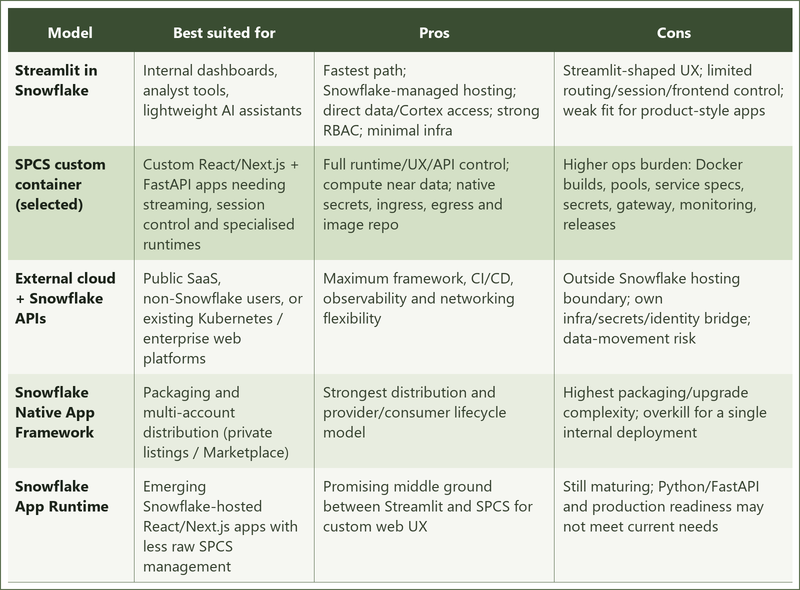
In short, Streamlit suits simple internal apps, Native Apps suit multi-account distribution, external hosting suits public SaaS platforms, and SPCS is the better fit when you need a custom frontend and API while keeping Snowflake as the data and security boundary.
For this solution, SPCS with a custom container was the deliberate choice. Streamlit would have been faster to stand up, but it would not have supported the level of frontend and session control required here. External hosting would have preserved that flexibility, but at the cost of another infrastructure stack, another identity bridge and another place where sensitive data may need to travel. Native Apps would have been overkill for a single internal deployment in one Snowflake account.
SPCS sits in the middle of that trade-off. It keeps Snowflake as the data and identity boundary, while still allowing a full Docker-based runtime with FastAPI, Next.js, custom routes and streaming behaviour. The application, the data and the user identity tokens never leave Snowflake’s trust perimeter. Access controls, secrets, compute and network egress are governed by the same Snowflake RBAC and security primitives that protect the underlying data.
App Overview and Demo
Snow GPT is a multi-tenant aged-care data assistant. Authenticated Snowflake users get four surfaces behind one container and one session:
- Chat – Cortex Agents orchestrates document search (Cortex Search) and structured analysis (Cortex Analyst); responses stream as text, tables, SQL and charts
- Daily briefing – live SQL aggregates in the chat sidebar
- Trends – time-series Vega-Lite charts over operational data
- Shift handover – structured shift data plus a Cortex Complete narrative for nursing handover
Users sign in with Snowflake OAuth. Downstream Cortex and SQL calls run under the user’s own token and role, so existing row-level controls govern what each tenant can see. The demo domain is aged care (facilities, residents, notes, staffing and related operational content), but the pattern applies to any governed multi-tenant dataset already in Snowflake.
Architecture Overview
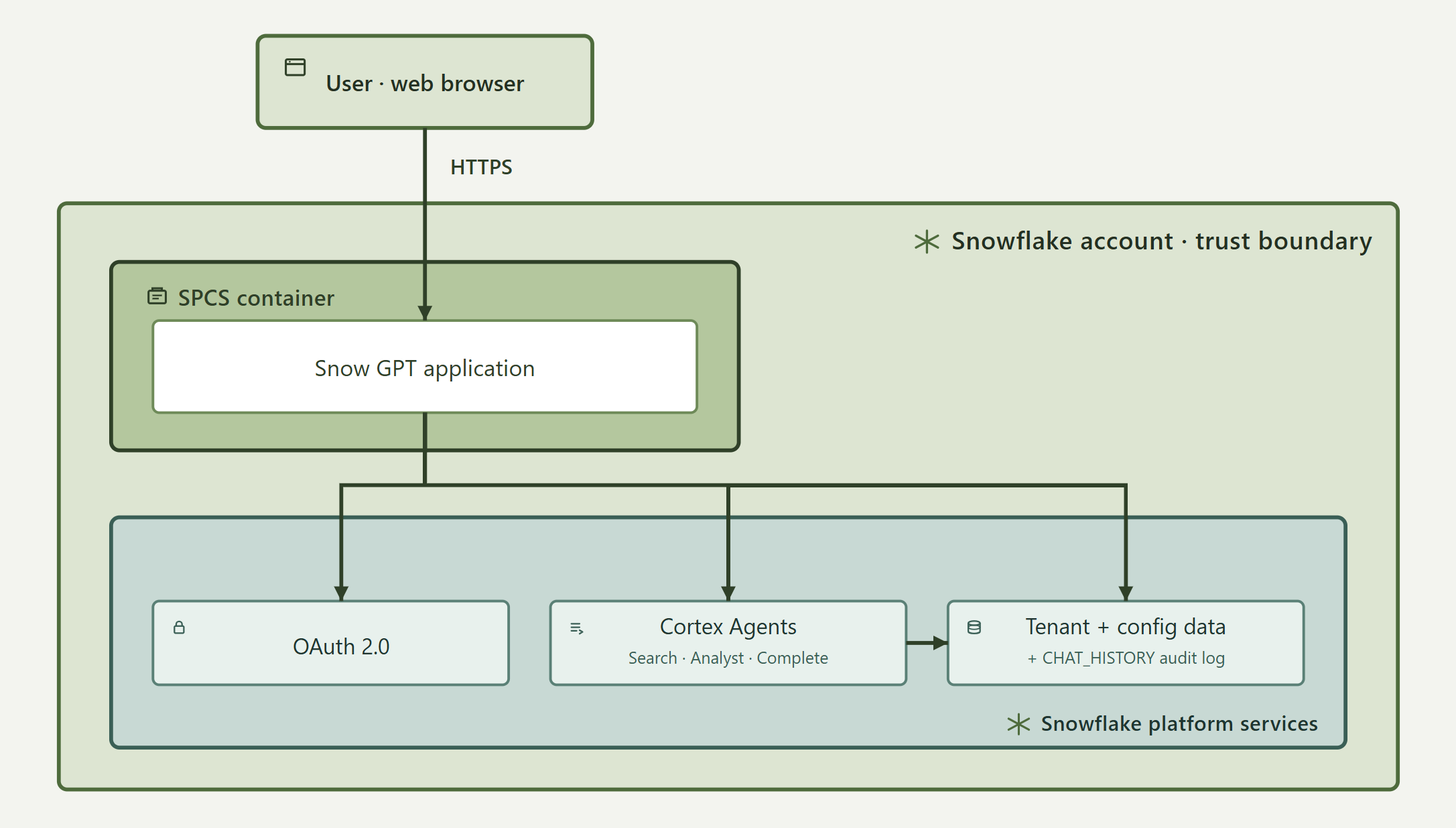
The architecture is organised around a small set of principles. Snowflake remains the system of record and the policy enforcement point: operational data, tenant configuration, semantic views, roles and row access policies all live in the platform. User identity is preserved through AI execution – Cortex Agents, Cortex Complete and the SQL API run under the signed-in user’s OAuth token, not a privileged service account. Tenant identity is derived from the authenticated Snowflake role and never accepted from client parameters. The backend is a thin orchestration layer. Frontend and API ship as one artefact. Chat is streamed; briefing, trends and handover return cached JSON.
At the outer boundary, a browser reaches Snow GPT over HTTPS. The application runs as an SPCS container inside the Snowflake account trust boundary, alongside OAuth, Cortex services and tenant data – not as an external system calling in. There is no separate Model Context Protocol server; the app calls Cortex Agents, Cortex Complete and the SQL API directly. No customer data is sent to a separate application cloud or third-party model provider. The browser receives only the rendered application response, while the SPCS runtime communicates with Snowflake through controlled, allow-listed endpoints (click on image to expand).
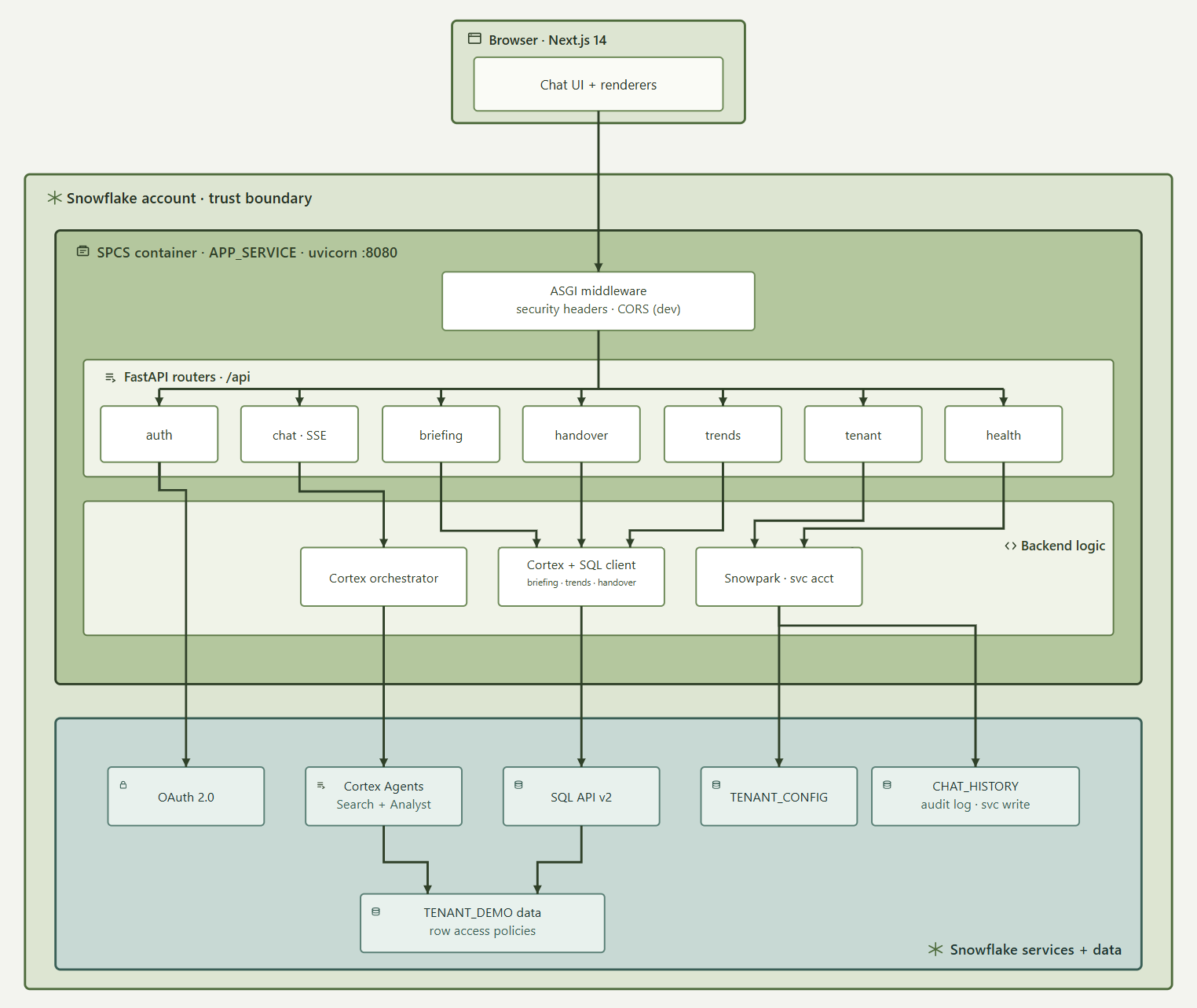
The runtime is a single container: a Next.js 14 static export for the UI, served by a FastAPI backend on Uvicorn port 8080 from the same origin. That keeps session handling, browser security and deployment simple – one image, one service, no production CORS bridge between frontend and API.
Requests enter through ASGI middleware (security headers; CORS only in development), then FastAPI routes into auth, chat, briefing, handover, trends, tenant and health. Authenticated routes validate an encrypted HttpOnly session cookie, refresh the Snowflake OAuth token if needed, apply per-route rate limits, and call backend services.
Chat is the primary path. The browser posts to POST /api/chat; the backend streams Server-Sent Events. A Cortex orchestrator builds the agent:run payload, injects a TENANT_KEY filter for document search, normalises streamed events and deduplicates repeated blocks. Cortex Agents uses Cortex Search for clinical/care-plan text and Cortex Analyst for structured operational questions. Conversation state stays in the browser – each request resends prior text turns; there is no user-facing conversation resume API.
Briefing, trends and handover also use the user’s OAuth token via a shared SQL API client. Briefing returns daily aggregates for the sidebar. Trends builds Vega-Lite chart specs from time-series queries. Handover gathers structured shift data, then calls SNOWFLAKE.CORTEX.COMPLETE for the nursing narrative. Those endpoints are JSON with server-side TTL caches (briefing ~10 minutes, trends ~1 hour, handover ~5 minutes).
A Snowpark service-account session is used only for platform tasks: reading TENANT_CONFIG (branding and model settings) and writing completed chat turns to CHAT_HISTORY. It never executes user AI queries and never reads TENANT_DEMO operational data. That split identity model – user token for tenant data and AI, service account for config and audit – is the central security design point (click on image to expand).
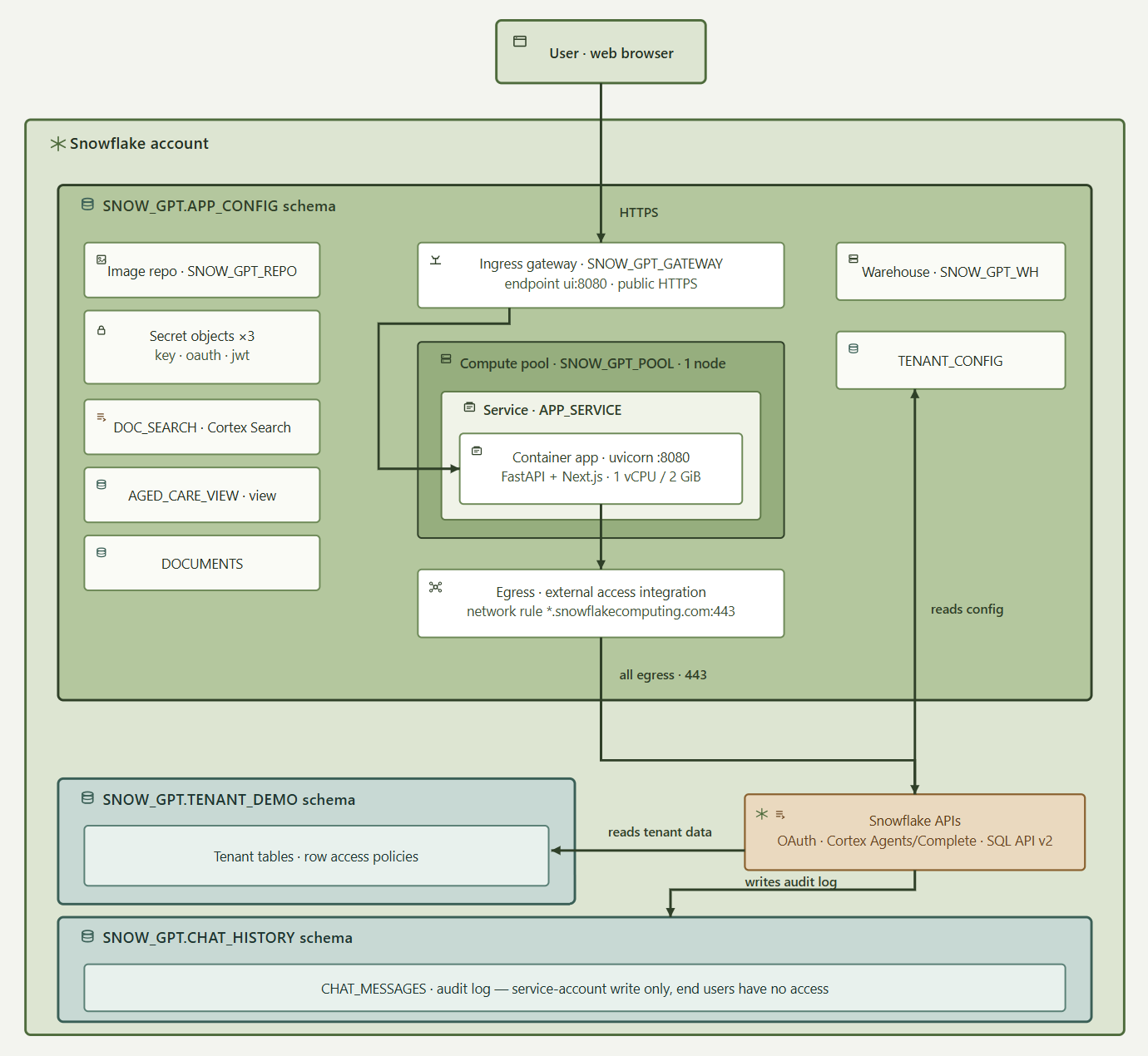
On the infrastructure side, public traffic enters through the SPCS ingress gateway SNOW_GPT_GATEWAY, which exposes ui:8080 and provides a stable public URL. That stability matters because OAuth redirect URIs are bound to the app address; the gateway keeps the URL valid across service upgrades. APP_SERVICE runs in compute pool SNOW_GPT_POOL as a single node, with the container capped at 1 vCPU and 2 GiB – an intentional POC scale, not a production HA claim. The image is a two-stage build (Node for the Next.js export, Python for FastAPI) pulled from SNOW_GPT_REPO.
Secrets – service-account private key, OAuth client secret and session encryption secret – are Snowflake Secret objects injected at runtime, not baked into the image. Outbound access is restricted by a network rule and External Access Integration to *.snowflakecomputing.com:443 only, covering OAuth, Cortex and the SQL API. The container cannot reach arbitrary external hosts.
Data ownership is reflected in three schemas. SNOW_GPT.APP_CONFIG holds the image repository, secrets, gateway, compute pool, service, TENANT_CONFIG, DOCUMENTS, DOC_SEARCH and AGED_CARE_VIEW. SNOW_GPT.TENANT_DEMO holds multi-tenant operational tables (facilities, rooms, beds, residents, staff, progress notes, care plans and related objects), each row carrying TENANT_KEY and protected by row access policies. SNOW_GPT.CHAT_HISTORY.CHAT_MESSAGES is an append-only audit log of user and assistant turns, readable only by ACCOUNTADMIN, SYSADMIN, SNOW_GPT_ADMIN and SNOW_GPT_APP_ROLE – end users cannot read it back, even for their own messages (click on image to expand).
Authentication is Snowflake OAuth 2.0 with PKCE. After login, the app issues a Fernet-encrypted HttpOnly session cookie (tokens, tenant and role stay opaque if leaked). Tenant isolation is layered: OAuth sign-in, tenant-specific default role, backend role-to-tenant derivation, user-token Cortex/SQL execution, row access policies on CURRENT_ROLE(), an explicit Cortex Search TENANT_KEY filter, and least-privilege grants on warehouse, schema, semantic view, search service and tables.
Around the edges, the orchestration layer also applies rate limiting (chat 20/min, briefing 30/min, trends 20/min, handover 10/min, login 30/min), security headers, production same-origin behaviour and input validation. Those controls harden the app; they do not replace Snowflake policy. Clinical and regulatory sign-off for real resident data remains an organisational gate beyond this POC architecture.
Why this architecture also wins on cost is easy to understate. A single-node CPU_X64_XS compute pool is Snowflake’s smallest SPCS instance class, and with AUTO_SUSPEND_SECS = 300 it scales to zero credits five minutes after the last request – you pay only for active usage, not for a permanently-on server, load balancer and orchestration layer the way you would hosting the same FastAPI/Next.js container on ECS, Cloud Run or a VM. The trade-off is a cold-start delay of roughly ten to twenty seconds the first time someone opens the app after an idle period — acceptable for an internal or moderate-traffic assistant, and tunable by raising MIN_NODES to 1-always-on if that latency ever matters more than the idle credit spend. Compare that to the standing cost of a separate application cloud: a load balancer, container runtime, secrets manager, and identity bridge running continuously regardless of traffic, plus the egress cost and latency of shipping tenant data out of Snowflake on every request.
Beyond Healthcare: Other Industries, Same Architecture
The pattern here – a governed dataset already in Snowflake, a custom UI instead of a generic dashboard, and user-scoped OAuth and row access policies enforcing who sees what – generalises far beyond aged care: financial services could use it for fraud triage or compliance copilots over transaction data; retail and CPG for demand-planning or inventory assistants over point-of-sale and supply data; manufacturing for quality and supply-chain dashboards over plant telemetry; insurance for claims-triage tools over policy and claims history; telcos for network-operations copilots over usage data; life sciences for clinical-trial data explorers under strict data-residency rules; and public-sector agencies for citizen-services portals where data must never leave a sovereign boundary. Each of these swaps in a different schema, role model and frontend, but the same shape carries across unchanged – and when an application is mainly a governed interface over data that already lives in Snowflake, another hosting stack is often more complexity than value.
BI tooling and Streamlit still suit simpler internal apps, but for custom apps that need streaming, session control and Cortex under the user’s own identity, SPCS lets the application sit beside the data without inventing a second security perimeter. It is not the right fit for every application, and not a shortcut past clinical or regulatory review – but for Snowflake-centric data assistants that need a modern UI inside the platform that already owns the data and the identity model, it is an increasingly practical one.
http://scuttle.org/bookmarks.php/pass?action=addThis entry was posted on Sunday, August 2nd, 2026 at 3:25 pm and is filed under Snowflake, SQL, Uncategorized, Visualisation. You can follow any responses to this entry through the RSS 2.0 feed. You can leave a response, or trackback from your own site.





admin August 6th, 2026 at 9:19 am
Any model hosted by Snowflake or accessed through Cortex Agents or Cortex Complete can be used for this solution. As per Snowflake documentation: “Cortex Agents supports models from the Claude (Anthropic), GPT (OpenAI), Grok (SpaceX) and Gemini (Google) families”